

Upgrade Your Self-Hosted NetBird Installation
Updated
Check for Updates
The NetBird Dashboard displays an update indicator at the bottom of the left navigation menu when a new version is available:
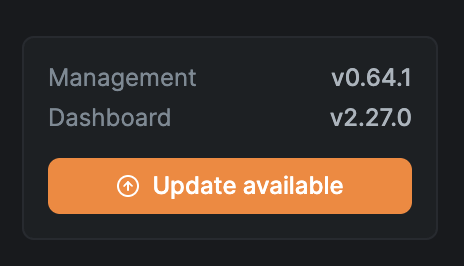
You can also check the current version programmatically via the API (requires authentication):
curl 'https://your-netbird-domain/api/instance/version' \
  -H 'accept: application/json' \
  -H 'authorization: Bearer <your-access-token>'
Example response:
{
    "dashboard_available_version": "2.28.0",
    "management_available_version": "0.64.1",
    "management_current_version": "0.64.0",
    "management_update_available": true
}
Check Release Notes
Before upgrading, review the release notes for any breaking changes or migration steps:
- Dashboard: https://github.com/netbirdio/dashboard/releases
- Management, Signal, and Relay: https://github.com/netbirdio/netbird/releases
Management, Signal, and Relay are all part of the same repository and share the same version numbers.
Upgrade Steps
To upgrade NetBird to the latest version:
- Run the backup steps described in the backup section.
- Review the release notes (see above) for any breaking changes.
- Pull the latest NetBird docker images:
If you have the Reverse Proxy enabled, also pull the proxy image:
docker compose pull netbird-server dashboarddocker compose pull proxy - Restart the NetBird containers with the new images:
If you pulled the proxy image above, include it in the restart:
docker compose up -d --force-recreate netbird-server dashboarddocker compose up -d --force-recreate netbird-server dashboard proxy
Keep the Management and proxy versions in sync. Starting with v0.76.1, if the Reverse Proxy component runs a newer version than Management, Agent Network LLM cost metering is silently disabled (the proxy skips cost computation and only logs a warning). Upgrade Management before or together with the proxy.
Because the netbirdio/reverse-proxy:latest image tag does not tell you what is actually running, check the resolved proxy version with:
docker compose exec proxy /go/bin/netbird-proxy --version
Compare it with the management_current_version field returned by GET /api/instance/version before upgrading.
For upgrades from older versions (pre-v0.26.0), see the Legacy upgrade notes below.
Legacy Setup (Separate Containers)
If your deployment uses the older setup with separate containers (management, signal, relay, coturn), pull and recreate those containers instead:
docker compose pull management dashboard signal relay
docker compose up -d --force-recreate management dashboard signal relay
If you have the Reverse Proxy enabled, also pull and recreate the proxy:
docker compose pull proxy && docker compose up -d --force-recreate proxy
Get In Touch
Feel free to ping us on Slack if you have any questions.
- NetBird managed version: https://app.netbird.io
- Make sure to star us on GitHub
- Follow us on X